


Working with standard formats
 Main menu: Construction – Tables and title block –
  Drawing title/borders.
Toolbar: Drawing title/borders ( “Tables and title block”).
 Command line: SPFORMAT, FORMAT.
- Filling in the fields of the title block
- Drawing title/borders recognition
Fundamental rules
Each format type is an element of the database nanoCAD Construction , which is located in the folder “Drawing border templates” library nanoCAD Construction .
emplates major labels and additional fields are located in the subfolder formats “Title block templates”. Renaming or deleting existing items in the folder “Drawing border templates” would make it impossible to insert existing formats.
Insert the format by clicking on the icon Drawing title/borders. This dialog box appears Format:
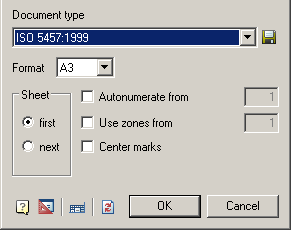
This window is defined by:
*Format.
*Sheet.
*Autonumerate from.
*Use zones from.
*Center marks.
After selecting the type of document, as well as the size and orientation of the sheet is inserted into the selected format.
*To edit the frame size, double-click the left mouse button on the contour of the frame.
*To edit the text in the title block, double-click on the text of the left mouse button.
*To edit entries in the title block, double-click the left mouse button on any line of the title block.
If you remove the first sheet of the scope of its information from the title block is automatically transferred to the second sheet.
To save the settings template attached stamps and their parameters in the database, click on the button  , then enter the path stored in the database and the template name.
General Principles
To change the line frames the template files, edit the frames and other fields.
“Document Type” – Select the document type from the list format template in section database. Depending on the document type is changed appearance and availability of individual dialog items “Format”.
“Format” – the choice of the size of the sheet on the basis of standard size and multiplicity (not available for the types of documents based on the standard ISO, because the multiplicity inherent in the choice of format).
“Leaf” – the choice of template title block for the first or subsequent sheets.
“Orientation” – select page orientation (vertical or horizontal).
“Autonumerate from” – Automatic Numbering sheets. It lets you specify the number of the first sheet.
“Use zones from” – avtoprostanovka zones. It lets you specify the number of the first zone.
 Edit main stamp
After you select the document type and size under the proposed set the insertion point of the frame. If you press Enter or right mouse button, the lower left corner of the frame is aligned with the coordinate 0,0.
 Set default stamps – restores the template format those stamps which were overwritten while maintaining format template database.
Feedback

Post your comment on this topic.