


Simplified weld joint
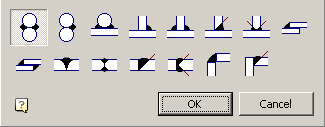
 Main menu: Construction – Weld –
  Simplified weld joint.
Toolbar: “Weld” – Simplified weld joint.
 Command line: SPWJ.
I*mportant!*
As the rods and plates can be used primitives nanoCAD: circle and polyline (a special case polylines: rectangles, and polygons).
To use the unit as a plate or an object from the database, you must use when choosing an instrument Magnet plate for constructing the circuit plate.
Primitives must be tangent to each other.
Type: two rods overlap joints.
To add an overlap joint:
Call the command.
Select the drawing first rod .
Select the second rod.
To select the direction of one-way seam weld placement.
 Two-way joint.
 One-way joint.
 Two-way joint.
Type: T-connection between two rods..
To add a T-joints:
Call the command.
Select the drawing first plate .
Select the second plate.
To select the direction of one-way seam weld placement.
 Two-way joint.
 One-way joint.
 Two-way joint.
 Two-way joint.
Type: two plates overlap joints.
To add an overlap joint:
Call the command.
Select the drawing first plate.
Select the second plate.
To select the direction of one-way seam weld placement.
 Corner seam-sided.
 Corner sided seam.
Type: Butt joint of two plates.
To add a butt joint:
Call the command.
Select the drawing first plate .
Select the second plate.
To select the direction of one-way seam weld placement.
 One-way butt weld.
 Sided butt weld.
 One-way butt weld.
 Sided butt weld.
Type: Angular connection of two plates.
To add a butt joint:
Call the command.
Select the drawing first plate.
Select the second plate.
To select the direction of one-way seam weld placement.
 Corner seam-sided.
 Corner seam-sided.
Feedback

Post your comment on this topic.