


Purging of document
 nanoCAD button – Utilities >
  Purge
Purge
Menu: File – Drawing Utilities >  Purge …
Document tab context menu: Utilities > Purge…
 Command line: PURGE
This command is used to purge unused named elements from a document: block descriptions, dimension styles, layers, text styles and line types.
Using this procedure, you can reduce file size after finishing your project.
ATTENTION! Deleted elements cannot be recovered.
The Purge dialog box appears after the command is launched. There is a list of elements which available for deletion, and a list of elements which are not available for deletion. The list is organized as a tree: to open a list of elements of one type, click twice on the elements name or select the sign to the left of the name. If there is no sign, it means that there are no elements of this type to delete (or which cannot be deleted).
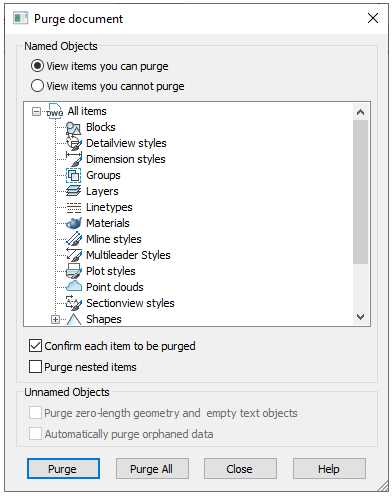
Parameters:
View elements you can purge  Switches on the mode for viewing elements which can be deleted from a document.
View elements you cannot purge Switches on the mode for viewing elements which cannot be deleted from a document. Elements, used in a document or standard items which cannot be deleted.
Confirm each item to be purged Switches on the mode for displaying a query to confirm for each purged element. For further purge in an automatic mode, at any moment you can click Yes to all in a query box.
Purge nested items Switches on the mode for purging all unused named objects contained inside other unused named objects. The purge is confirmed in a separate dialogue box.
Purge zero-length geometry and Switches on the mode for purging graphical waste. The checkbox is not available in case
empty text objects such geometry is absent in a document.
Automatically purge orphaned Purges outdated vector data styles of DGN format.
data
Buttons:
 Purges the selected elements.
 Purges all elements from the list.
To delete elements with confirmation:
1. Switch on the Confirm each item to be purged mode.
2. Select the !https://manula.r.sizr.io/large/user/13178/img/purging-of-document-s-3.png or button.
3. In the opened dialog box confirm purging of the elements:
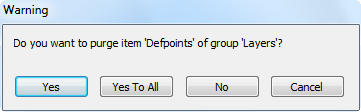
Buttons:
 Confirmation for every selected element.
 Confirmation for all elements.
 Refuse to delete the selected element.
 Cancels the purge command.
Purging a document using the command line
Command line: -PURGE, -PU
Command options:
Full Automatic full purge of a document. Including the purge of objects having zero-length geometry, empty text objects, annotative scales and registered applications.
All Purging unused objects of the same nesting level. Objects having zero-length geometry and empty text objects are not purged.
Command prompts:
Enter type of unused objects to purge [Blocks/DEtailviewstyles/Dimstyles/Groups/Layers/LTypes/MAterials/MUltileaderstyles/Plotstyles/SHapes/textSTyles/Mlinestyles/SEctionviewstyles/Tablestyles/Visualstyles/Regapps/Zero-length_geometry/Empty_text_objects/Orphaned_data/ANnotscales/Point_clouds/Full/All]:
Enter name(s) to purge <*>:
Feedback

Post your comment on this topic.