


Object
Menu item object allows it to work with database objects in nanoCAD Construction :
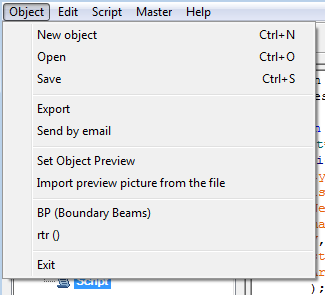
Object – creates a new element base (By pressing keys Ctrl+N or clicking on the icon Create on the toolbar).
After issuing this command, a dialog box appears to New object
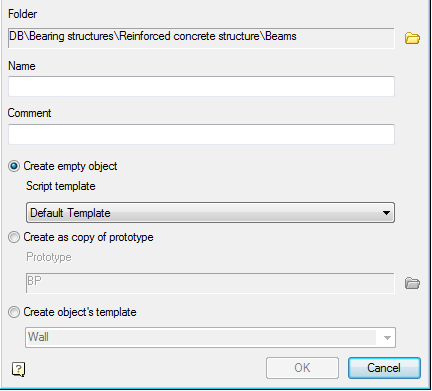
To create a new object, you must specify:
Folder in which to save the new object
Name (will be displayed in the browser)
Comment (will be displayed in the tooltip)
Select a way to create a new object.
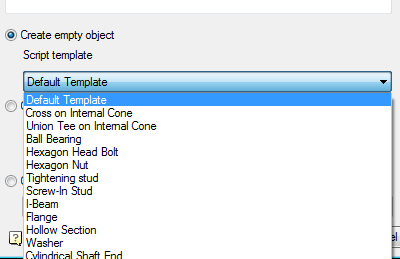
Create an empty object – creates a table and designs without having one script selected from the template.
Default template – empty script.
Create as copy of prototype – creates an object by copying the entire prototype object (along with the script, tables, performances and three-dimensional models.

Use the button to select an object to create a prototype object.
Open – Open an existing part (keyboard shortcut Ctrl+O or icon Open on the toolbar).
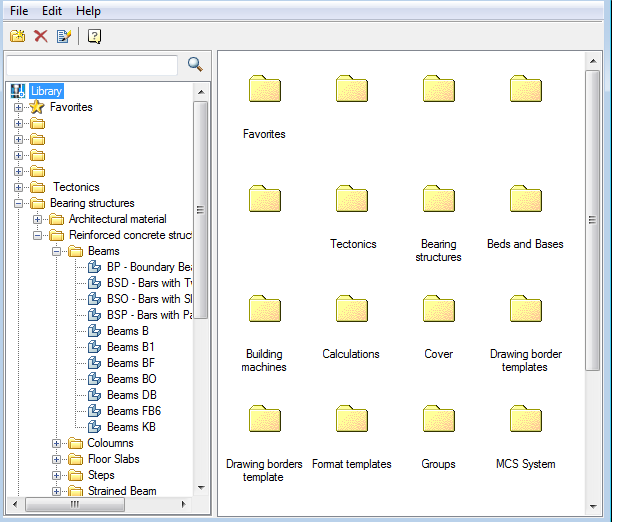
After selecting the command, a dialog box appears Select the details allowing you to select or find the item in the current database in Construction Site 4.
Save – save changes to the current member base (keyboard shortcut Ctrl+S or icon Save on the toolbar).
Set object preview – allows you to set as a preview for the object in the browser database objects nanoCAD.
Exit – close Master objects
In paragraph object available list of recently used items.
Feedback

Post your comment on this topic.