


Text Encoding Conversion
 nanoCAD button – Utilities >
  Decode Text
Menu: File – Drawing Utilities >  Decoder DWG…
Document tab context menu: Utilities > Decoder DWG
 Command line: TEXTDECODER
Text and named objects (blocks, layers, text and dimension styles, line types) encoding conversion.
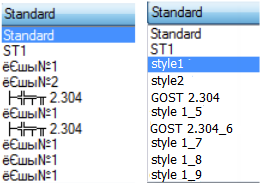
The utility helps fix the problems when texts and object names are replaced by garbled symbols, characters or hieroglyphs associated with incorrect recognition of the text code page.
The command opens the Text Decoder dialog box.
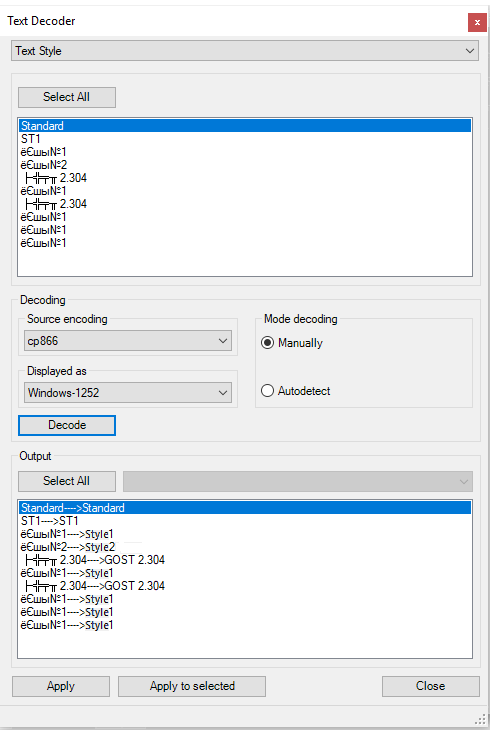
Options
Select  Select from the list of drawing elements that contain named objects and texts. Named objects of the selected element are displayed in the section window.
Select all Select all named objects displayed in the section window. A random selection of objects for conversion can be made by using Ctrl and Shift keys.
Decoding
Source encoding Selection of supposed type of source encoding from the list.
Displayed as Selection of supposed type of target encoding from the list.
Decoding modes
Manually The mode of manual encoding selection.
Autodetect Automatic encoding selection.
Decode Start the decoding procedure.
Decoding output
Select all Select all decoding results displayed in the section window. A random selection of objects for encoding conversion can be made by using Ctrl and Shift keys.
Apply Apply all decoding results.
Apply to selected Apply the conversion results to selected elements.
Encoding conversion procedure
- Open the Selection list, select the named object or text that requires conversion.
- Select the necessary from the elements displayed in the section window or click Select all button to select all elements.
- Set the decoding mode:
- Select the encoding type from the Source encoding list.
- Select the encoding type from the Displayed as list.
- Click Decode.
Applying the decoding results
The decoding results are displayed in the section window after the separating characters ─>.
If conversion is made in the Autodetect mode, the list of decoding options becomes available for the element selected in the box.
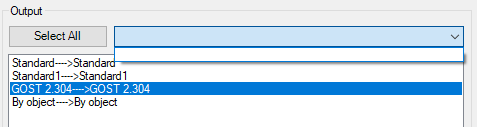
When using Manually mode, the desired result can be achieved by changing types of source and target encodings.
1. Select the elements with the correct decoding result in the section window.
2. Click Apply to selected button.
3. If all encoding conversion results are acceptable, click Select all button and Apply button.
Info: NanoCAD is an easy-to-use, cheap, and yet professional, CAD software tool for personal computer, that delivers a great user experience by providing top-level performance, full capability, a classic interface and native.dwg format support. nanoCAD has been built to deliver design and project documentation for all engineering purposes. nanoCAD includes a full suite of basic and advanced CAD tools for 2D/3D drafting and creating industry-standard DWG-compatible CAD files. Our freeware provides progressive, collaborative and customizable features to enhance your efficiency, and includes a number of API’s, allowing anything from routine task automation to complex CAD app development. You may download nanoCad for free, using the links below, and purchase later, if you like it.
Feedback

Post your comment on this topic.