


Create Geopoints Group Manually
 Ribbon: Topoplan – Geopoints >
  Create Groups of Geopoints Manually
Menu: Topoplan – Geopoints >  Create Groups of Geopoints Manually
Toolbar: Geopoints > Create Groups of Geopoints Manually
 Command line: C3D_CREATE_COGO_POINT_GROUP
Manual creation of a group of geopoints with a name, description, styles, and a prefix of the raw description of the geopoint, which is a criterion for adding points to the group.
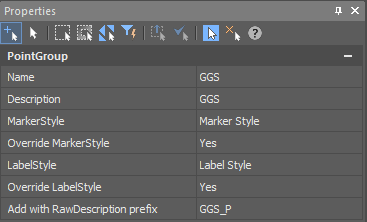
The command options are set in the Properties bar:
- Name;
- Description;
- Marker Style (of those existing in the drawing);
- Override Marker Style;
- Label Style (of those existing in the drawing);
- Override Label Style;
- Add with Raw Description prefix – the criterion for adding a point to the group. Allows you to add to the group only points with the specified raw description.
Command prompts:
| Change parameters in ‘Properties’ window and choose ‘OK’ to create Point Group or ‘Cancel’ to discard any changes <ОK> or [OK/Cancel]: | Yes – a group of geopoints will be created with the current settings. Cancel – if the settings have been changed, they will not be preserved. A group of geopoints will be created with the settings displayed right after the command starts. |
Feedback
Copyright © 2026 CSoft AS
—
Powered by 
Post your comment on this topic.