


Standards Check Options
 Ribbon: Manage – CAD Standards >
  Standards Settings…
Menu: Tools – CAD Standards > Check…
Status bar: context menu of the button  Check standards > Settings…
Dialog box Configure Standards: button Settings…
NOTE: The Standards audit button is displayed in the status bar only if at least one standard file was associated with a drawing.
Dialog box for setting standards check.
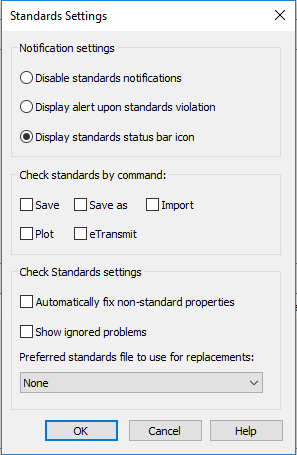
Options:
Notification settings
(system variable STANDARDSVIOLATION)
Disable standards notifications  Turns off notifications on standards violations and absence of standards files.
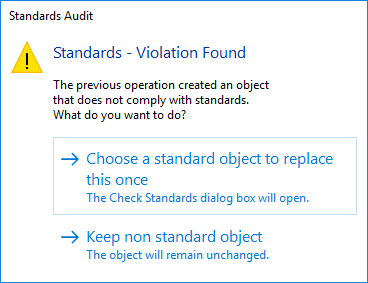
Display alert upon standards violation Turns on notifications in finding standards violations while working on the drawing in form of pop-up box that proposes options.
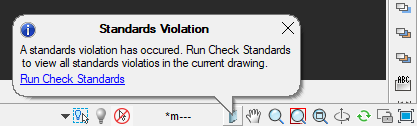
Display standards status bar icon Turns on notifications in finding standards violations while working on the drawing through an icon in the status bar.
Check standards by the command
Save, Save as, Import, Plot, eTransmit Select the commands in performing which the standards should be checked for violations.
Check options
Automatically fix nonstandard properties Manages the mode of automatic fix of nonstandard objects, if a more preferable replacement is available. Automatic replacement occurs only in cases when a nonstandard object has a name that matches the name of a standard object having different properties.
In this case, the properties of the standard object are assigned to the nonstandard object. After the check is completed the number of automatically fixed violations is displayed in the alert box.
Show ignored problems If in the Check dialog box the Mark this problem as ignored is flagged for the detected violation, then notifications on this problem will still be displayed in future.
Preferred to use for replacement The list of standards files which is the basis for default selection of a recommended fix in the Replace with list in the Check dialog box.
- If there is a recommended replacement (flagged in the Replace with list), then this recommended replacement is selected by default regardless of a file selected in this field.
- If no recommended replacement is found, and a standards file (DWS) is selected, the first replacement of the selected standards file is chosen.
- If None is selected for this option and a recommended replacement is absent, nothing is selected for replacement.
Info: NanoCAD is a simple, cheap, and yet professional, CAD app for personal computer, that delivers an outstanding user experience by providing enhanced performance, full capability, a classic interface and native.dwg format support. nanoCAD has been built to deliver design and project documentation for all industries. nanoCAD includes a full suite of basic and advanced CAD tools for 2D/3D drafting and creating industry-standard DWG-compatible CAD files. Our freeware provides progressive, collaborative and customizable features to improve your efficiency, and includes several API’s, allowing anything from routine task automation to complex CAD application development. You may download nanoCad for free, using the links below, and buy later, if you like it.
Feedback

Post your comment on this topic.