


Orientation mark for construction line
 Main menu: Construction – Coordinate axes –
  Orientation Mark for Construction Axis.
Ribbon: Construction – Architecture – Orientation Mark for Construction Axis.
Toolbar: Orientation Mark for Construction Axis ( “Coordinate axes”).
 Command line: SPCLINEORIENT.
In the drawing select the coordination axis.
Specify insertion point or distance in the selected direction. Distance is introduced based on the current scale nanoCAD Construction 25.
When editing inserted into the drawing pointer orientation dialog box appears pointer axis orientation
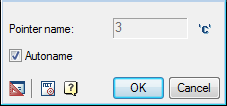
Marker Autoname automatically sets the name of the pointer axis orientation. By turning off the marker, you can specify your own name index.
Set the input field with a new name index. If necessary, add to the name of the index ‘C’, using the button C
Feedback

Post your comment on this topic.