


Break and Restore dimension line
 Main menu: Dimensions >
  Break dimension.
Main menu: Construction – Breaks > Break dimension line.
Ribbon: Annotate – Dimensions – Break dimension line.
Ribbon: Construction – Symbols > Break dimension line.
Toolbar: Dimensions > Break dimension line.
Toolbar: Construction Breaks> Break dimension line.
 Command line: SPDIMBREAK, DIMBREAK.
To create a dimension line break, you must:
- Call the command;
- Select the dimension. If the size was selected before calling the command, you do not need to select it again;
- Select two points by specifying a section of the dimension line to create a break;
- The break will be made.
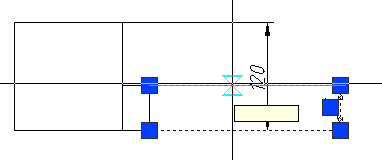
First point selection
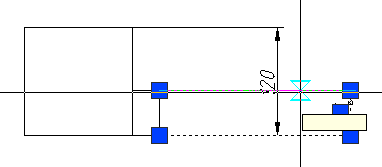
Second point selection
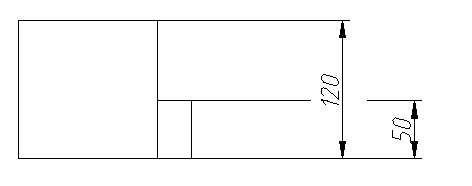
Result
Restore dimension line
Main menu: Dimensions >  Restore dimension.
Main menu: Construction – Breaks > Unbreak dimension line.
Ribbon: Unnotate – Dimensions > Unbreak dimension line.
Ribbon: Construction – Symbols > Unbreak dimension line.
Toolbar: Dimensions > Unbreak dimension line.
Toolbar: Construction Breaks> Unbreak dimension line.
Command line: SPDIMUNBREAK, DIMUNBREAK.
To restore the dimension line, you must:
- Call the command;
- Select the dimension. If the size was selected before calling the command, you do not need to select it again;;
- The restoration will be done.
Feedback

Post your comment on this topic.