


Add markers
 Main menu: Construction – Coordinate axes –
  Add marker.
Ribbon: Construction – Architecture – Add marker.
Toolbar: Add marker ( “Coordinate axes”).
 Command line: SPADDMARKER.
In the drawing select the coordination axis.
In the dialog box Additional markers specify a name to the marker.
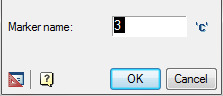
Click OK.
Specify the name of the second additional marker and click OK or click Cancel to exit.
Feedback
Copyright © 2026 CSoft AS
—
Powered by 
Post your comment on this topic.