


The Technical conditions
It specifies settings of text of the technical requirements of nanoCAD Construction .
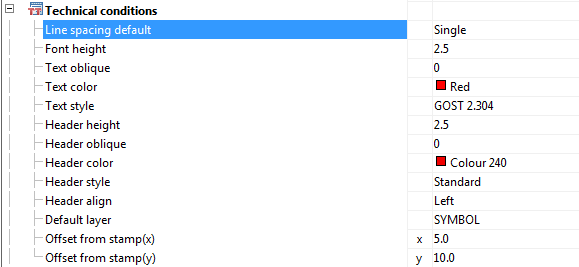
Line spacing default
Sets the default line spacing in the text of the technical requirements.
Font Height
Sets a default text height.
T*ext oblique*
Sets a default value of the slope of the text in degrees.
Text Color
Sets color of text in technical requirements
Text style
Sets the default text style specifications.
Header height
Sets a default value of header height in technical requirements.
Header oblique
Sets a default value of the header oblique angle in degrees.
Header Color
Sets color of header
Header Style
Sets the default header style.
Header align
Aligns the heading of technical requirements for the title block.
Default Layer
Sets the standard layer to accommodate the technical requirements.
Designations indicate areas near to the position
Automatically inserts lettering area next to the item number.
Offset from title block(x)
Sets the value of the indentation from the left edge of the title block horizontally.
Offset from title block(y)
Sets the offset value from the main vertical lettering.
Feedback

Post your comment on this topic.