


Diameter
 Main menu: Dimensions >
  Diameter.
Ribbon: Annotate – Dimensions > Diameter.
Ribbon: Construction – Symbols > Diameter.
Toolbar: Dimensions > Diameter.
Context menu: Diametral – when calling any dimension.
 Command line: SPMDIMDIA, MDIMDIA.
Procedure
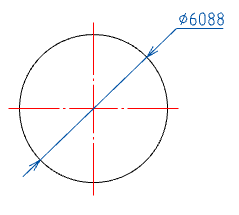
To apply the dimension of the circle, you must:
1. Select the dimension “Diameter”;
2. Select the circle, the dimension snaps to the circle;
3. Pick an insertion point.
Feedback
Copyright © 2026 CSoft AS
—
Powered by 
Post your comment on this topic.