


 Ribbon: Topoplan – Utilities >
  Managing Block Marker Attributes
Menu: Topoplan – Utilities > Managing Block Marker Attributes
Toolbar: Topoplan Utilities > Managing Block Marker Attributes
 Command line: NG_H_TO_ATTRIBUTE
The command copies the Z coordinate value of a block to its attribute and vice versa, and also swaps the Z coordinate and attribute values.
The command options are set in the Properties bar.
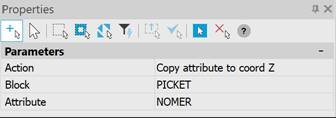
| Action | Copy attribute to coord Z – fills the value of the Z mark with the value of the selected block attribute (only if the attribute has a numeric value). Copy coord Z to attribute – fills the selected block attribute with the Z mark value. Swap attribute and coord Z – is selected in the case when the attribute value and the Z mark value should be swapped. |
|---|---|
| Block | Block selection. |
| Attribute | Attribute selection. |
Feedback
Copyright © 2026 CSoft AS
—
Powered by 
Post your comment on this topic.