


Similar construction line
 Main menu: Construction – Coordinate axes –
  Similar to Construction Axis.
Ribbon: Construction – Architecture – Similar to Construction Axis.
Toolbar: Similar to Construction Axis ( “Coordinate axes”).
 Command line: SPSIMILARCLINE.
Select the drawing coordination axis.
Specify the distance or the insertion point next axis. In the context menu of available commands (N-Name/E-New/D-dialog/ A-fill angle).
Complete the action of the cyclic command.
Plug-axis automatically numbered in ascending order
When you insert available context menu commands (1-Name , 2-Dialog and, 3-Angle)
When you choose one-name on the command line, you are prompted to enter a new designation for the following axis.
Command 2 Dialog brings up a box next axis
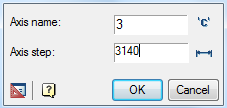
When you click OK to the axis it is added to the input field name in the distance determined in the pitch axis of the previous axis.
Push-button pitch / angle or changes over the distribution of axes when inserting – orthogonal or polar.
Exit the dialog box by clicking Cancel.
- Command 3-angle (3-distance) changes over the distribution of axes when inserting.
Feedback

Post your comment on this topic.