


Dimension Style Manager
 Main menu: Format –
  Dimension Styles….
Main menu: Dimensions – Dimension Styles….
Ribbon: Home – Annotation – Dimension Style Manager.
Toolbar: Settings – Dimension Style Manager.
 Command line: DIMSTYLE.
The software defaults to a government industry standard dimension style.
Dimension styles allow you to control the appearance of dimensions and quickly format them.
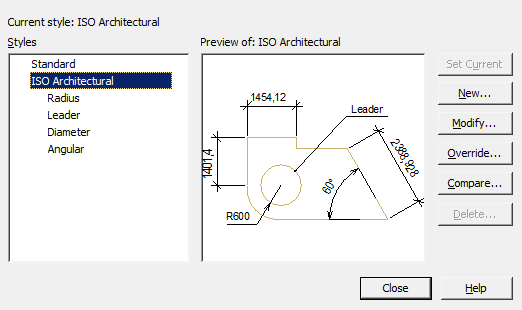
Dialog box composition
The inscription “Current style: …” – information about the current dimension style, which is used when applying dimensions.
“Styles” list – a list of all dimension styles in the document.
The “Preview of: …” window is a graphical representation of the style selected in the “Styles” list.
Buttons:
- Set current – sets the selected dimension style current.
- New… – opens a dialogue “Creating style”.
- Modify… – change the parameters of the style selected in the list. Opens dialog “Modify dimension style”.
- Override… – change the parameters of the current dimension style. Opens dialog “Modify dimension style”.
- Compare… – compare two dimension styles, or view a list of all the properties of a style. The comparison results can be copied to the clipboard. Opens dialog “Comparing Dimension Styles”.
- Delete… – deletes the selected dimension style.
Restoring the Dimension Style
Command line: SPSETGOST, SETGOST.
This command is necessary to create (restore) the standard dimensional style of the environment nanoCAD Construction .
Dimension style settings are stored within drawing files. If the file was not created in nanoCAD Construction , then it may not have the required dimension style for correct work in the nanoCAD Construction environment.
Feedback

Post your comment on this topic.