


To Add Measurement File
Adding Measurement File
 Ribbon: Topoplan – Measurements Archive >
  Add Measurements
Menu: Topoplan – Measurements Archive > Add Measurements
Toolbar: Measurements Archive > Add Measurements
 Command line: NG_GEOFILE_ADD_MEASUREMENT_FILES
Adding measurement files to the archive. The command moves the selected files (without opening) to the measurements archive.
The command can be launched from the ribbon, menu, command line, and context menu of the Geofiles folder in the File Explorer bar.
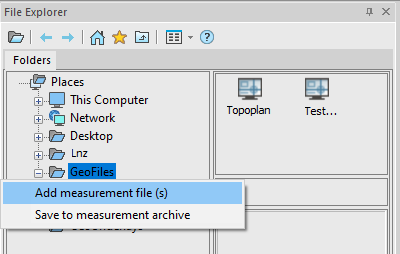
In the dialog that opens, select the measurement file to be added. Supported formats: DWG, SDR (Sokkia), CSV, XYZ, TXT. If the Geofiles folder is absent, then while Adding or Saving measurement files, the folder is created automatically in the path – \Users\*******\AppData\Roaming\Nanosoft AS\nanoCAD x64 25.0\GeoFile.
Feedback

Post your comment on this topic.