


Binding to a table cell
In the formula, you can use any cell values of the properties of another object. If using automatic recalculation of the table, the formula object is automatically recalculated. Each cell can attach one or more objects. Objects are named Object1, Object2, and Object3, sequentially numbered in the table. If the object is not used in a formula, it will detach from the table at the next calculation, and the object references are renumbered.
Binding properties for drawing objects to a single cell then use the expression or the keys Shift+F2. Available in the context menu of the selected cell.
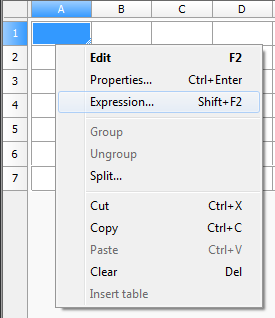
After selecting the command window opens the Expression Builder.
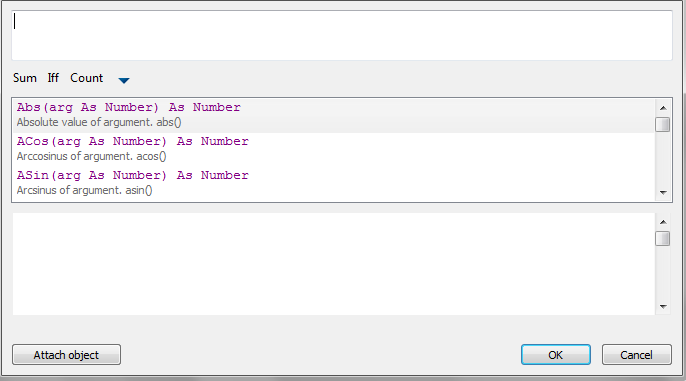
Click Attach it.
Select the object whose data you want to send to the table (eg, Bolt M52). Now the list of expressions appears in the properties of the selected object. Double-clicking on the property (select Object.Name), adds it to the text in a cell. Click OK.
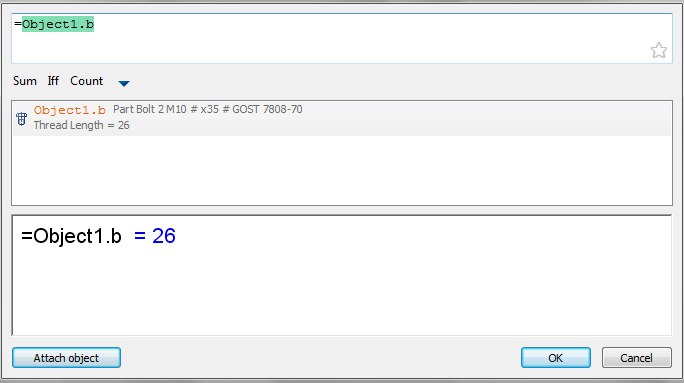
After connection of the facility to the cell the cell color changes (it says that the formula in the cell) and it will display the calculated result, in this case the name of the object:

Feedback

Post your comment on this topic.