


The Array
 Main menu: Construction – Library objects – MechWizard >
  Parametric model.
Ribbon: Construction – MechWizard > Parametric model.
Toolbar: Parametric model ( “MechWizard”).
 Command line: SPWIZARR.
Create primitives of nanoCAD block and select the required dimensions in the sketch to determine its size and location.
Press the array and selected block in the drawing.
In the dialog box, select an array type and parameters that control the construction of the array. Parameters can be assigned to both numeric and non-numeric values (variable names and expressions).
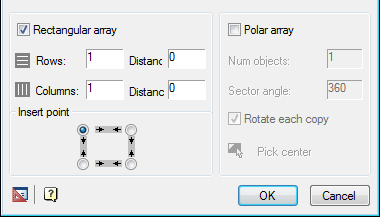
Every single unit with a unique name that is inserted into a sketch can be used only in a single array.
Feedback
Copyright © 2026 CSoft AS
—
Powered by 
Post your comment on this topic.