


 Ribbon: Topoplan – Geopoints >
  Creating Geopoints by Points and Texts
Menu: Topoplan – Geopoints >  Creating Geopoints by Points and Texts
Toolbar: Geopoints > Creating Geopoints by Points and Texts
 Command line: NG_CREATE_POINTS_BY_TXT
The command creates geopoints by points (circles, blocks) and text objects (Texts, MTexts) found at a specified distance. The maximum distance for text search is specified in the drawing.
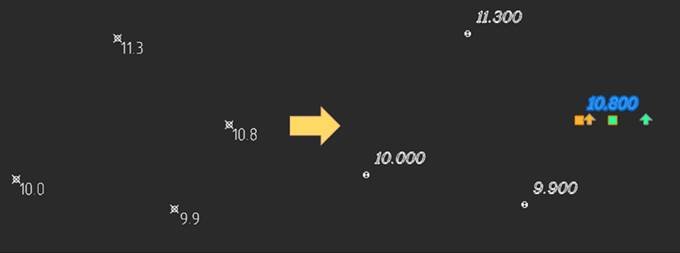
Command prompts:
| Select objects or [?]: | Select objects to be converted to geopoints. |
|---|---|
| Text with elevation or [Text/MText/Both]: | Specify the type of text objects from which information for geopoint labels should be taken: single-line text, multi-line text, or both at the same time. |
| Max Distance. Specity first point: | With a mouse click, specify on the drawing the first point of the maximum possible distance from the point to its label. Within this distance from a point (circle or block), the command will search for a text object – a label Specify a distance with a small margin: a little more than the maximum distance from a point to its label (text object) in the drawing. |
| Specify second point: | Specify the second distance point. |
| Remove original objects? or [Yes/No]: | Specify whether to delete the original objects or not. |
| Input a new COGO group name or [AllPoints]: | Enter a name for a new group of geopoints or accept the proposed name. |
The parameters of the Creating Geopoints by Points and Texts command are configured in the Properties bar.
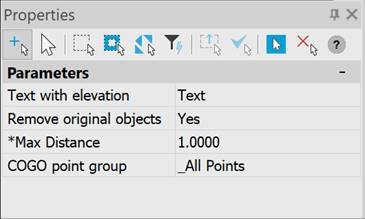
- Text with elevation;
- Remove original objects;
- Max Distance;
- COGO point group;
| Text with elevation | Selection of single-line and multi-line text to get a label, or both. |
|---|---|
| Remove original objects | Specifies whether to delete the original objects or not. |
| Max Distance | Distances from point to text. |
| COGO point group | Creating a group for new geopoints (if the group is not specified, put it in the _All Points group) |
Feedback
Copyright © 2026 CSoft AS
—
Powered by 
Post your comment on this topic.