


The Special characters and fonts
The dialog boxes for callouts and editing tables contain buttons for inserting special symbols, which open the nearest window in which the symbols used in design are displayed.
For remote printing button  “Insert special character”.
To the Editor button table  “Insert Character”.
Select the character you want by clicking on it with the left mouse button, after which it is automatically inserted at the current cursor editing table.


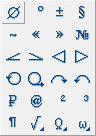
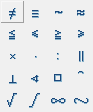
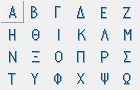
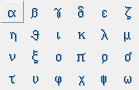
Special characters are displayed correctly only in font-based texts nanoCAD Construction (.shx). When inserted into a text based on a TrueType font, the characters do not display correctly on the screen (they are replaced with question marks, rectangles, etc., depending on the TrueType font settings).
Feedback
Copyright © 2026 CSoft AS
—
Powered by 
Post your comment on this topic.