


 Ribbon: Topoplan – Modify TIN >
  Adding a Group of Points
Menu: Topoplan – Modify TIN > Adding a Group of Points
Toolbar: Modify TIN > Adding a Group of Points
 Command line: NG_MESH_VERTEX_ADD_BY_POINTS
The command adds a group of points (geopoints, blocks) to the surface using the interpolation principle.
To add a group of points:
1. Select one surface.
In response to a prompt on the command line -
Select point type or [Points/COGOPoints/Blocks]:
select the type of points.
3. In the Properties bar, configure the command parameters
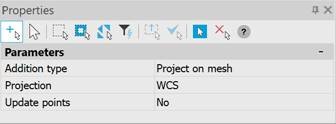
| Addition type | Project on mesh – Project points of the mesh surface. By point – take current coordinates without projection. |
|---|---|
| Update points | The parameter is available when selecting the By point addition type Selection of the elevation source. For points: – Position For COGOPoints: – Position – Custom property For blocks: – Position – Attribute |
| Projection | The direction in which points will be projected onto the surface (WCS, UCS or Viewport). |
| Update points | The data of the point to be updated. No – we change the surface, but do not change the starting points. Position – we change the surface, as well as the position of the points to a new one, projected onto the surface. |
Feedback
Copyright © 2026 CSoft AS
—
Powered by 
Post your comment on this topic.