


Circular construction axis
Circular construction axis
 Main menu: Construction – Coordinate axes –
  Separate Circular Construction Axis.
Ribbon: Construction – Architecture – Separate Circular Construction Axis.
Toolbar: Separate Circular Construction Axis ( “Coordinate axes”).
 Command line: SPCIRCCLINE.
To create a separate rotary axis:
Specify center point of the axis.
Specify the radius of the arc.
Specify marker angle.
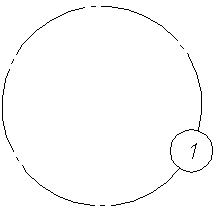
Context menu of the rotary axis is as follows:
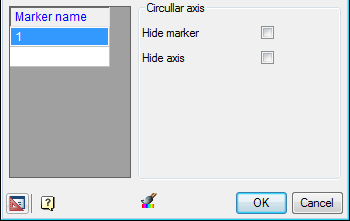
Column Marker name contains a list of the names of the markers. To add a new marker, click in an empty field and enter the name of the marker.
Arc axis
- Hide marker – hides the marker and is only displayed in the drawing axis;
- Hide axis – the axis hides, showing only the marker;
Feedback
Copyright © 2026 CSoft AS
—
Powered by 
Post your comment on this topic.