


Inserting Groups
 Main menu: Construction – Library objects – Markers, Groups >
  Insert group.
Ribbon: Construction – Library objects > Insert group.
Toolbar: Insert group ( “Library objects”).
 Command line: SPINSERTGROUP.
 Library: Groups.
Command Options
Insert group Box lets you create a set of objects with superimposed parametric and geometric constraints.
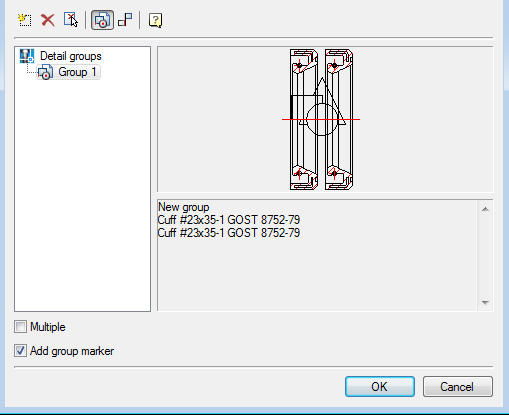
Create group
Deleting Group
Select group details from drawing
Switch between groups of objects and dependenciesThe mechanism used in the team group insert , you can insert a group of objects
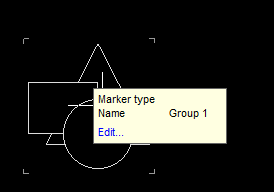
The “Add marker group” enables the group a graphic element – a marker located at the insertion point of the group. In marker may include parameters of individual parts group that can help you when pasting automatically change the geometry of the group of related components.
“Multiple insert” allows you to create multiple copies of the selected group.
If a user group has been maintained by the standard in the folder $\MCS\Groups, then insert it in the tree by choosing the object manager.
If a group is defined form, then insert dialogue is as follows:
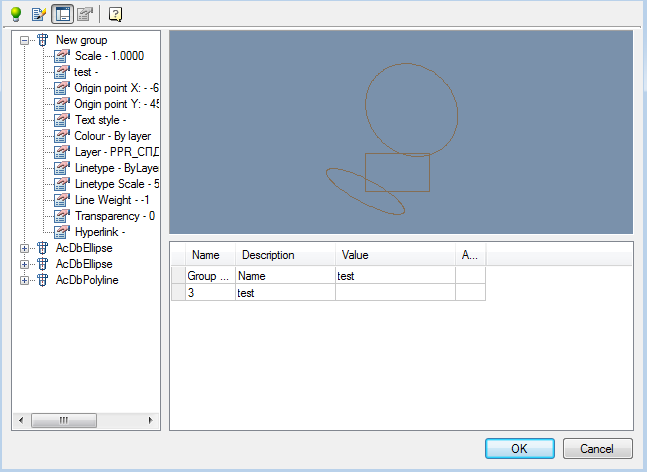
The dialog box includes a tree of groups – a list of objects and their parameters group. This tree can disable button
The preview window group
Form input values group
When you click on you can switch to edit mode group settings.
Feedback

Post your comment on this topic.