


In nanoCAD there is a mechanism for embedding of raster images. Inserted images saved in external raster files can be embedded and saved in drawing file.
To embed the raster:
1. Open dialog External References (menu Insert – External References).
2. Select reference to a raster image.
3. Click the  Embed image button.
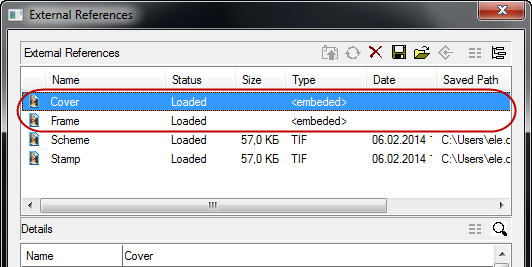
Embedded image has no saved path, and type of reference becomes Embedded.
ATTENTION! Embedded raster images increase the file size greatly.
Using !https://manula.r.sizr.io/large/user/13178/img/sf.png!* Save file* dialog command and assigning saved path you can make the image inserted as reference again.
Feedback
Copyright © 2026 CSoft AS
—
Powered by 
Post your comment on this topic.