


Selecting the direction of drawing
When drawing some graphics nanoCAD Construction may require special functions choice of direction of drawing. For example, when constructing Weld seam.
Functional toolbar “Destination” is automatically activated when a call instruction nanoCAD Construction , which is available for control of the direction of drawing.
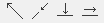
Toolbar commands “Destination”:
- Perpendicular. Construction perpendicular to the selected segment.
- Free. The choice is arbitrary direction.
- Along. Construction along the selected segment.
- Parallel. Parallel to the selected segment.
When constructing select the desired command and specify the length of the drawing, to be followed by leveling (except commands “Free”).
Feedback
Copyright © 2026 CSoft AS
—
Powered by 
Post your comment on this topic.