


The Distribution range
 Main menu: Construction – Notes >
  Distribution range.
Ribbon: Construction – Symbols > Distribution range.
 Command line: SPRANGE.
Procedure
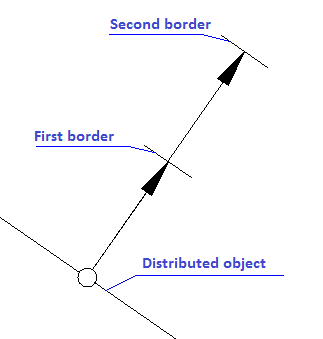
- Select the shared object.
- Select the first point of the border.
- Select the second point of the border.
The command to create a symbol distribution range recurring structural elements in the specified bounds. Arrow pointer automatically aligned perpendicular to the shared object. Beginning marker band (contour point) automatically closes the line on which is situated.
Feedback
Copyright © 2026 CSoft AS
—
Powered by 
Post your comment on this topic.