


Point Cloud Project Manager
Point Cloud Project Manager
 Ribbon: Point Clouds > Point Cloud >
  Point Cloud Project Manager
Menu: Point clouds > Point Cloud Project Manager
Toolbar: Point clouds > Point Cloud Project Manager
 Command line: NPC_PROJECT_MANAGER
Point Cloud Project Manager allows you to manage the project created during the point cloud import process.
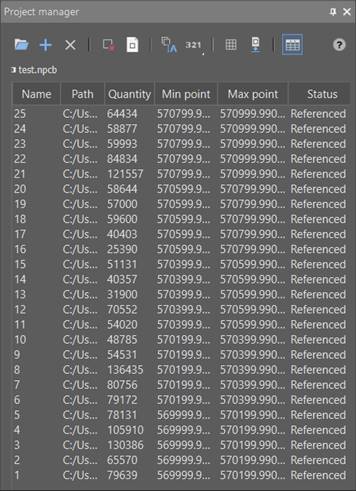
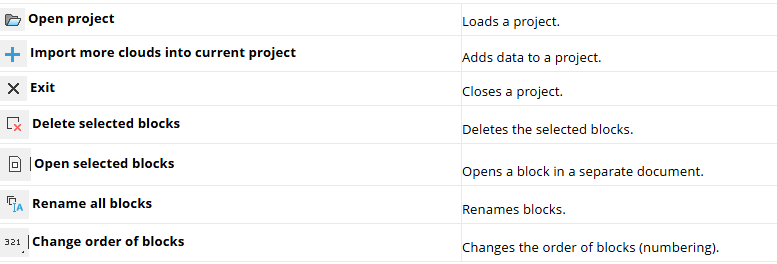

The dialog also has a context menu:
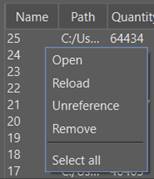
Open – Open the DWG block in a separate document.
Reload – Reload the cloud.
Unreference – Break the block’s connection with the current DWG.
Remove – Remove the block from the NPCP project completely and break all connections with it, this action is irreversible (a warning message appears).
Deselect – Remove the selection from the selected blocks.
Select all – Select all blocks in the project.
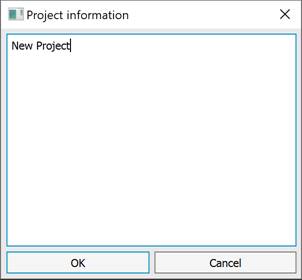
Double-clicking in the dialog box opens the Project information window, where you can add additional information about the project.
NOTE In case of duplication of block names, a warning message is displayed.
Feedback

Post your comment on this topic.