


Control the Display of Object (Isolation)
The isolation commands control the visibility of objects by isolating or hiding a selection set. Use ISOLATEOBJECTS and HIDEOBJECTS to create a temporary drawing view with selected objects isolated or hidden.
The commands are used to create a temporary view of the document when you need to hide the selected objects, or isolate – leave visible only the selected objects, hiding all others.
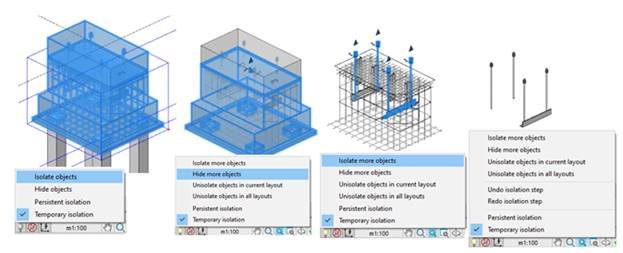
The commands for controlling the display of objects are located in context menu and Tools – Isolate Objects menu:
![]() Isolate Objects
Isolate Objects![]() Hide Objects
Hide Objects![]() Undo isolation step
Undo isolation step![]() Redo isolation step
Redo isolation step![]() Unisolate objects in current layout
Unisolate objects in current layout![]() Unisolate objects in all layouts
Unisolate objects in all layouts![]() Unisolate objects
Unisolate objects
 Isolate Objects
 Hide Objects
 Undo isolation step
 Redo isolation step
 Unisolate objects in current layout
 Unisolate objects in all layouts
 Unisolate objects
NOTE: Isolation and undo is independent of the general undo-redo mechanism (UNDO/REDO). For example, you can isolate a set of objects, edit them, and then roll the isolation back to a previous visibility state. In this case, all changes for the edited objects will remain.
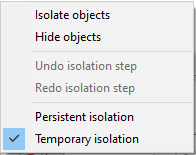
Control the display of objects placed in the menu of  Toggle Isolate button in status bar.
| Persistent isolation | Selected objects stay hidden or isolated after save, close and reopen of drawing. |
|---|---|
| Temporary isolation | Selected objects are isolated or hidden in the current program session. |
Selected objects are isolated or hidden in the current program session.
there are no hidden and isolated objects in the drawing. Available functions: Isolate objects Hide objects
 – there are hidden and isolated objects in the drawing. Available functions: Isolate more objects Hide more objects Unisolate objects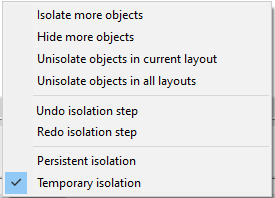
Feedback

Post your comment on this topic.