


Section
 Main menu: Construction – Views and Sections >
  Sections.
Ribbon: Construction – Symbols > Sections.
Toolbar: Sections (on toolbar “Views and Sections”).
 Command line: SPSECT.
Procedure
1. Call the team. A dialog box will open “Cut”;
2. In the dialog box, enter the required parameters. Press the button “OK”;
C 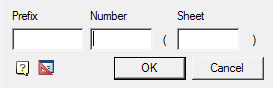
3. Select path type: Arc or Segment. For each type its own order of postorieniya;
- Segment. Allows you to create a cut in the form of a broken line;
Pick the first cut point;
Pick the subsequent cut points. To finish entering points, press the key “Enter”; - Arc. Creates an arc section;
Select the desired arc construction method:Arc (3 points), Arc (2 points and bend), ARc (2 points and center);
Build an arc according to your choice.
4. Select the direction of the cut arrows.
Feedback
Copyright © 2026 CSoft AS
—
Powered by 
Post your comment on this topic.