


Rename construction lines
 Main menu: Construction – Coordinate axes –
  Rename Construction Axes.
Ribbon: Construction – Architecture – Rename Construction Axes.
Toolbar: Rename Construction Axes ( “Coordinate axes”).
 Command line: SPRENAMECLINES.
Select construction line.
In the dialog box, enter the name of the axis. Click OK.
Select the drawing focal axis that you want to rename.
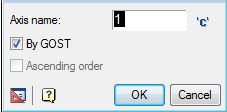
Switch by GOST enabled by default is used to select the direction of renaming. Also included is a marker which will verify compliance with GOST: axis names: exception letters, Cyrillic characters, similar numbers, etc.
When the switch is ascending order axes from left to right and top to bottom.
If you turn off both switches numbering axes in descending order, i.e, from right to left and top to bottom.
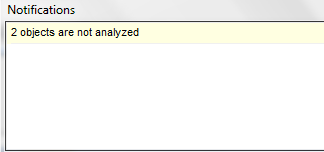
If some of the selected axes are arranged non-parallel to the first axis, a message is shown, which indicates the number of these axes.
Feedback

Post your comment on this topic.