


Creating custom formats and stamps
Before you create a custom size or stamp is necessary to draw a pattern nanoCAD means in accordance with the required desired view object being created. When drawing templates should adhere to the following rules:
- The template can contain lines, arcs, and circles, text (single-line and multi-line), the objects of the library of standard parts nanoCAD Construction , blocks nanoCAD;
- the thickness of the lines that are assigned to the template thickness is not equal to zero, and not “layer” to be adopted in accordance with the thickness of the closest standard value;
- the color lines and text included in the template will be saved according to the selected values;
- multiline text (mtext) is inscribed in the boundaries of the rectangular area of text is selected when you create it.
You can use overhead lines and graphic objects, which are not drawn when inserting format or stamp in the drawing.
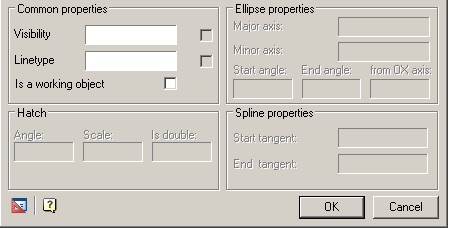
To install a drawing object as a service, use the button  “Set parameter” toolbar MechWizard, select the object, and in the dialog “Object properties” check the box “Is a working object”:
- Use the links in the templates
- New border wizard
- New title wizard
Feedback
Copyright © 2026 CSoft AS
—
Powered by 
Post your comment on this topic.