


View and Section Label
 Main menu: Construction – Views and Sections >
  View and Sections label.
Ribbon: Construction – Symbols > View and Sections label.
Toolbar: View and Sections label (on toolbar “Views and Sections”).
 Command line: SPVSDESC.
In the dialog box “Designation of views, cuts…” enter the text notation. To denote the section or section select “Cut”.
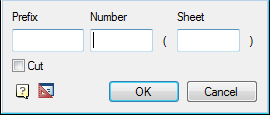
Click “OK”.
Specify the insertion point notation.
Feedback
Copyright © 2026 CSoft AS
—
Powered by 
Post your comment on this topic.