


Creating a dimension style
Button “New…” in the dialog box “Dimension style manager”.
The new style is based on the existing style.
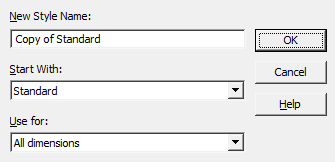
Dialog box composition
Field “New Style Name” – style name.
List “Start With” – the style on the basis of which the new one will be created.
List “Use for” – a dimension sub-style is selected from the list (applicable only to certain types of dimensions).
Button “OK” – opens a dialogue “Modify dimension style”.
Feedback
Copyright © 2026 CSoft AS
—
Powered by 
Post your comment on this topic.