


Special keys
Key SHIFT
Key Shift used:
- Holding down the SHIFT key is used when placing a dimension value. To place a dimension value closer to any extension dimension line, move the mouse pointer while holding down the SHIFT key. To complete the command, left-click.
![]()
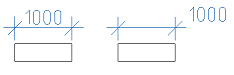
Key Alt
- To redefine the parameters of primitives included in standard parts, use the Alt + RMB combination, which calls the “Overrides” dialog:
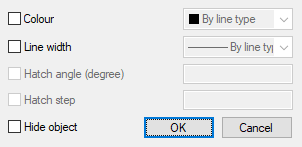
Allowed to override the following properties: color, line thickness, slope and pitch hatch of hidden objects.
Key Ctrl
- Holding down the Ctrl key is used to set the angle of extension lines when placing dimensions.
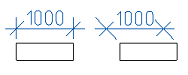
- Holding down the Ctrl key is used in the Form Editor to select the control type when dragging a variable onto a user form.
- Editing a table at the place (Ctrl + left-click).
- Ctrl+5 – strikethrough text, works in text input fields (in callouts, sizes, etc.), table cells, TC and TP.
- Ctrl+U – text underline, works in text input fields (in callouts, sizes, etc.), table cells, TC and TP.
- Ctrl+O – overline text, works in text input fields (in callouts, sizes, etc.), table cells, TC and TP.
Feedback
Copyright © 2026 CSoft AS
—
Powered by 
Post your comment on this topic.