


new 14
 Switch .Switches to monitor the status on/off. Several individual switches interconnected to form a “group switch” to track more states. Example of use of the group switch.
Description:
Several switches are associated with the same variable script. Each of them set any value. Variable is set to the included switch. Value is of type string. If set to “-1” value is assigned automatically starting with 1, in the tab order for TAB. In this case, the value type is numeric. Switches associated with a single variable group are considered. In the group may be included in only one switch. If a variable is assigned, grouped switches located inside one of the control. Usually this group or panel.
Properties command:
View
Visible
Tip
Linking (None)
enabled
Text Switch
Basic
Included
Value -1
Name radiobutton
Class Switch
Variable
Position
Upper limit 24
Height 24
left boundary 8
Lower limit 48
Right boundary 112
Width 104
Developments
by pressing
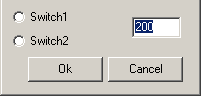
Example of using.
Switches allow you to choose between discrete values, the result is displayed in the input field
Feedback

Post your comment on this topic.