


Description Keys
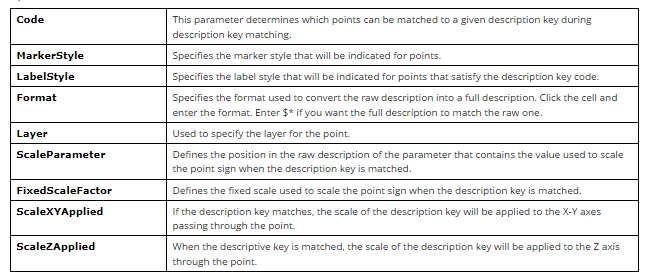
Description keys are used to automatically control certain properties of drawing points, such as a point appearance in the drawing, when points are created or imported.
Each drawing description key is defined by its own set of properties.
Code property
Used when searching for a match against a description key. For example, if the code matches the raw point description, the properties defined in that description key will be applied to the created point. The code may contain wild card characters that enhance the ability to match the description key. For more information, see the Description Key Code section.
Format property
Translates the raw description for a point into a full description. If the Format property is not set, the default value $* will be used. The value $* indicates that the raw and full descriptions are the same.
Styles are selected from preset styles. Layer – from one of those existing in the drawing.
Description keys are stored in a drawing as sets.
Code of a Description Key
The Code property is used to define the raw descriptions that match the description key.
A description key consists of a code and a set of additional properties. If the code matches the raw description, the created point is characterized by other properties specified in the description key.
Below there are examples of description key codes:
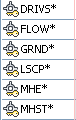
You can specify a simple string as the description key code, or you can use wildcard characters, such as an asterisk (*), to expand the search options for matching the description key.
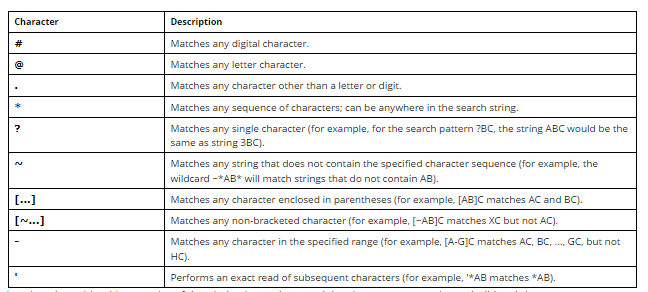
Below there is a table of wildcard characters used in description key codes:
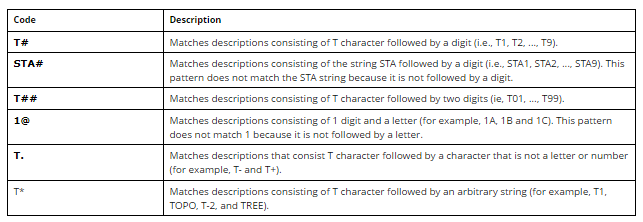
Below there is a table with examples of description key codes containing the most commonly used wildcard characters:
Creating a description key
 Command line: __aec_create_desckey
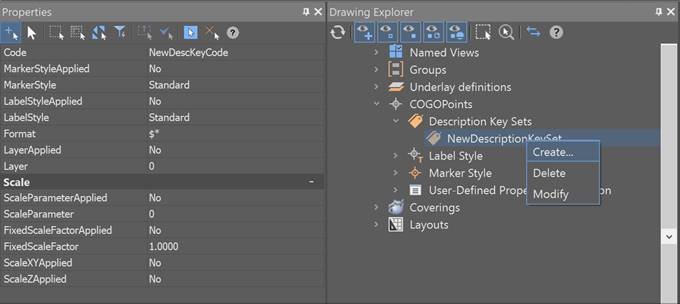
You can create a new description key by selecting Create from the context menu of any description key set in the Drawing Settings Drawing Settingssection of the Drawing Explorer.
Feedback

Post your comment on this topic.